$628 vs $320
the average job customers approve is $628. The average job they decline is $320. Seeing the work is what closes the gap.

Service Lane OS
AI video scoring grades every inspection video your team sends, out of 100, with frame-level coaching.
The AI watches the video itself, not just the transcript, so every advisor learns what earns a customer's yes and the whole team gets better on camera.
Every inspection video is scored out of 100 with frame-level coaching, so everyone learns what earns a customer's yes and the whole team gets better on camera.
Two real videos, graded the same way.
"I appreciate that you checked my car, but you never actually showed me the tires you were talking about."
"I feel like my truck is in the hands of someone who really cares about the details, not just looking to sell me things."
Marker positions are illustrative of the frame-level notes the AI coach returns.
Available on Service Lane OS Pro.
The whole difference is that you show, not just tell.
This video, an under-hood check-over, scored 48. The scorer gives credit for what worked and a specific fix for everything that didn't.
"I appreciate the quick update, but I would feel more confident if you used my name and showed me the actual components rather than just pointing near them."
Comprehensive review: you covered several key areas under the hood, including fluids, filters, and the battery, giving a good overview of the vehicle's "top half" health.
Clear visuals: your camera work was stable and focused on the engine bay area, making it easy to see where you were working.
Personalized intro: you started the video without a greeting or the customer's name. Always start by greeting the customer by name.
Direct evidence: you pointed at component housings with a tool but didn't actually show the condition of things like the engine air filter. Show the actual part, like pulling the filter out.
Provide context: stating something is "good" is helpful, but adding why makes it authoritative. Mention why a "good" battery or clean filter matters.
Professional closing: the video ended abruptly without a clear call to action or a professional sign-off. End with a clear next step and a polite goodbye.
Personalized start could add about 15 points. Adding the customer's name and identifying the vehicle makes the video feel like a premium, custom service rather than a generic update.
Actual evaluation returned by the Kimoby scorer.
The scores roll up into your media metrics, so coaching is targeted instead of guesswork.
Your technician opens the Kimoby app, scans the VIN, and records a short video showing exactly what needs the work. Hands-free with Meta AI glasses if you want. Noise cancelling, transcript, and AI summary come automatically.
The video is attached to the repair order and sent to the customer by text, so they can watch it the moment it lands, in the thread they already use. No email, no app.
The customer watches on their phone, sees exactly what the tech found, and approves the work with a tap. No phone tag, no waiting on hold, and a time-stamped record of what they said yes to. On CDK, the payment writes back to the RO.
Customers approve what they can see. That is why the score matters.
the average job customers approve is $628. The average job they decline is $320. Seeing the work is what closes the gap.
average increase on repair orders that include a video.
upsell generated by video inspections per rooftop, per year, at the 90th percentile of top-performers.
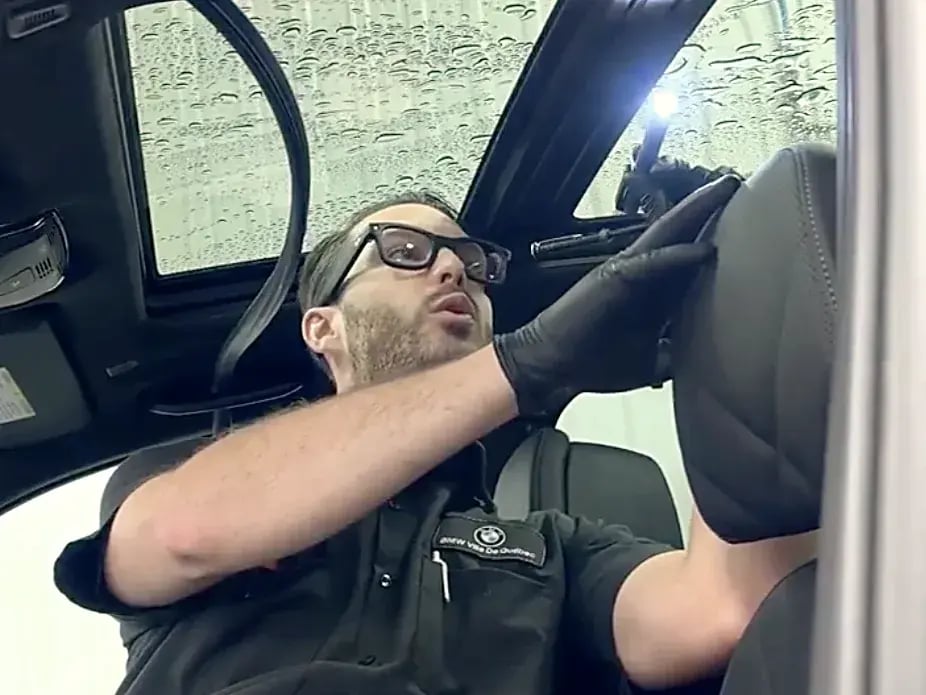
Your tech records the walkaround with both hands on the vehicle, the video uploads straight to Kimoby, and the AI coach scores it like any other inspection video.
Nothing changes in the workflow. Every inspection video sent through Kimoby is scored automatically.
It first identifies the type of video, then applies the right rubric, because a walkaround and a status update have different jobs. Each video gets a score and a written evaluation: the customer vibe check, what worked, what to improve, and the quick wins worth the most points.
Advisors can check the score before the video reaches the customer. Managers track scores by advisor in metrics and pull the best videos by repair order.
Kimoby is so intuitive, there is almost no learning curve. I have employees with little to no computer experience, and they were able to grasp everything in no time.
 Brian Maguire
Fixed Operations Manager, Porsche Centre Langley
Brian Maguire
Fixed Operations Manager, Porsche Centre Langley
Six habits separate the 93 from the 35.
Open with a greeting, the customer's name, and their vehicle, and close with a short summary. Videos that start and end abruptly lose points before the inspection even begins.
Put the camera on the tire, the brake, the filter you mention. The 35 named 8 mm tires and 7 mm brakes and never showed them, and that alone was worth about 30 points.
Say the tread and the brake pad in millimetres, on camera, and explain the safety limit. It is the difference between a claim and proof.
Evidence on screen, not a rushed clip. The 93 was a 2:22 walkthrough with the debris and the dirty filter shown, not told.
A pneumatic tool drowning out your voice costs real points. Wait for the loud tools to stop, and Kimoby's noise reduction cleans up the rest.
The customer should feel looked after, not sold to. It is the gap between "you never showed me" and "someone who really cares."
Book a demo and we'll show you a real inspection video graded out of 100, with the coaching your advisors get back.
AI video scoring grades every service inspection video your team sends, out of 100, with frame-level coaching and a written evaluation per advisor. It is part of Kimoby's Video-to-Customer on the Service Lane OS.
No. The AI analyzes the video itself, frame by frame, not just what was said. It catches things a transcript never could, like a shot of the front brakes that is too dark to see anything.
Show what you say. Put the camera on the tire, brake, or filter you mention, state the measurement in millimetres, do a full walkthrough with the evidence on screen, and keep a calm, helpful tone. Those habits separate a top-scoring video from a low one.
Each score comes with a customer vibe check (how the customer likely felt), what worked, what to improve with a specific tip for each item, and the quick wins worth the most points.
Yes. This page is the "example of a good video" reference dealers and OEMs ask for, with the score and the reasoning side by side.
No. Videos are scored automatically as they are sent through Kimoby. The coaching comes back to the advisor, so improvement happens through feedback, not extra process.
AI video scoring is in Beta and included with Video-to-Customer on the Service Lane OS 2026 plans, Essential and Pro. Ask your account manager to confirm it is active on your store.



The Dealership Engagement System (DES)™ for automotive service departments.
Step 1 of 2
Tell us who you are, then grab a time that works for you.
Dites-nous qui vous êtes, puis choisissez un moment qui vous convient.