<img height="1" width="1" style="display:none" src="https://www.facebook.com/tr?id=160502848039072&amp;ev=PageView&amp;noscript=1">

Service Lane OS

Digital estimates your customers approve in a couple of taps.

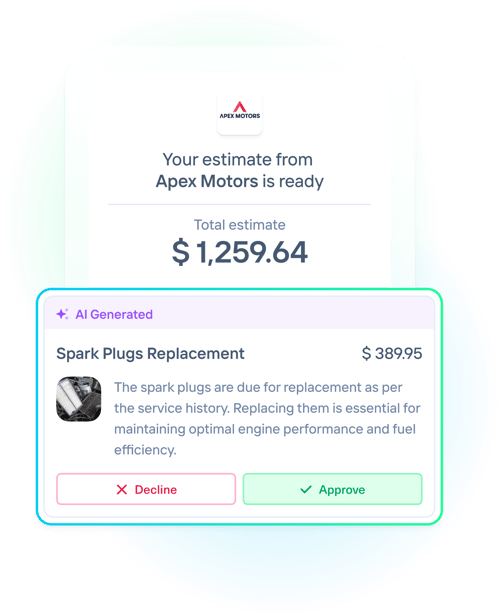
Send professional, visual estimates by text that customers can approve in seconds.

Kimoby turns every inspection into clear estimates built on your OpCodes, backed by video, and written back to your DMS. Send interactive quotes that customers can review and approve from their smartphone. No phone calls, no confusion.

Book a demo
speed_approvals_2

1,000+ dealerships run on Kimoby.

Works with your DMS CDK Reynolds & Reynolds PBS Tekion Keyloop Serti Dealer Vu Quorum
Part of the Service Lane OS Inspection, estimate, approval, and payment in one conversation

Digital Estimates are part of the Service Lane OS.

The estimate is not a standalone PDF. It is built from the inspection, carries the video that justifies the work, goes out in the same text thread as the status updates, and the customer's line-by-line approval writes back to your DMS, ready to pay. One conversation from inspection to approved work.

Build it, send it, approved

Here is how a digital estimate moves through your service lane.

1

Build it, or let AI draft it.

Build quote with clear line items, the 3Cs (cause, concern, correction), and your OpCode pricing. Or on Pro, let AI draft it from a completed inspection so your team reviews instead of builds. No lines your customer can't read.

2

Send it by text.

One click sends a clean, visual estimate to the customer's phone, with the photos and video attached. Every line has its own description, price, and status.

3

Customer approves in seconds.

They tap the link and approve or decline each line, no login and no app. You are notified instantly, and the approved work writes back to your DMS so you can book it and move the car.

Built to make customers say yes

Clear line items, real proof, and one-tap approval, all from the tools your team already uses.

Line items with the 3Cs

Cause, concern, and correction on every line, with parts, labor, and your OpCodes. Clear to the customer, no "misc" lines.

OpCode & parts pricing

Import your OpCodes and parts pricing from the DMS so the quote follows your own pricing logic. On Service Lane OS Pro.

AI-drafted estimates

On Pro, AI drafts the estimate from a completed inspection, writing readable 3Cs and matching OpCodes and parts from 7+ years of Kimoby data. You review instead of build.

Line-by-line approval

Customers approve or decline each item in a couple of taps. No login, no app, no calling back.

Automatic fees

Trigger the right fee from the OpCode, environmental, shop supplies, disposal, and it lands in the fees section on its own.

Taxes on the estimate

Show subtotal, taxes, and total so the number the customer approves matches the invoice. Optional, if that is how you run.

Video and photos on the line

Attach the inspection video or a photo to a line so the customer sees the issue and approves it faster.

Visual and mobile-ready

A clean, organized estimate that looks right on any phone, each line with its own description, price, and status.

Notified on approval

The advisor is notified the moment a customer approves, so no one has to watch a screen to catch it and the work gets booked right away.

Financing on the total

The taxed total can be paid over time with Affirm, so a bigger approved estimate is easier to say yes to.

Field-by-field CDK write-back

Pick exactly what syncs to the DMS. One click pushes the additional services sold back to the RO. Approved RO lines write back, never a separate estimate file.

No login, no app

The customer taps a text link and approves. Nothing to download, nothing to create, no friction.

A verbal quote vs a digital estimate

The old way

  • Price read over the phone, or a paper quote at the desk
  • "Misc" lines the customer does not understand
  • Phone tag while the car sits and the bay waits
  • Customers hesitate, so recommended work gets declined
  • Approvals re-keyed into the DMS by hand

With Kimoby

  • A clean, visual estimate on the customer's phone
  • Clear line items with the video that justifies the work
  • Approve or decline each line in a couple of taps
  • Customers see it, understand it, and say yes faster
  • Approved work writes back to the DMS

What clear estimates do to approvals

When customers understand the quote, they approve more of it, faster.

6 minutes

median time for a customer to approve an estimate, versus about 22 hours the old way.

Below 4%

decline rate on additional repairs after switching to digital estimates.

50%

of estimate responses came back in under 10 minutes.

AI-drafted
estimates from a completed inspection, on Service Lane OS Pro
Writes back
approved work posts to the RO in your DMS
9.8/10
onboarding satisfaction

Fully integrates with your ecosystem

Success Story

Read full case study Book a demo
“My advisors use it religiously. The clarity in the communication is what sells the work. ”
Angie Prince

Angie Prince

Service Manager at Gus Brown Buick

See an estimate get approved by text.

Book a demo and we'll walk you through an estimate going out and getting approved, using your own workflow.

Book a demo

Frequently asked questions

Digital Estimates turn an inspection into a clean, visual quote built on your OpCodes and backed by the video. The advisor sends it to the customer by text, the customer approves or declines each line from their phone, and the approved work writes back to your DMS. It is part of the Service Lane OS.

They get a text with a link, open the estimate on their phone, and tap to approve or decline each line. No login, no app, no calling back. The advisor is notified instantly and the approved lines post to the repair order.

Yes, on Service Lane OS Pro. AI drafts the estimate from a completed inspection, and optionally the video transcript, writing readable cause-concern-correction lines linked to the failed inspection items and matching OpCodes and parts. Your team reviews instead of building from scratch. Starting from a video alone is on the roadmap.

Yes. Fees can be triggered automatically from the OpCode, environmental, shop supplies, disposal, and land in a fees section on the estimate. Taxes can show the subtotal, taxes, and total so the number the customer approves matches the invoice, and the taxed total is what carries into Affirm financing.

Yes, on Service Lane OS Pro. OpCode and parts pricing are imported from your DMS, so the quote follows your own pricing logic and stays consistent with how the shop prices work.

Yes. Approved lines write back to the repair order with a time-stamped record of what the customer approved, and on CDK you pick field by field what syncs. It works with CDK, Reynolds and Reynolds, PBS, Tekion, Keyloop Serti, Dealer Vu, and Quorum. Note that only repair order lines write back, never a separate estimate or MPI file.

Video-to-Customer is the inspection video that shows the customer the problem. Digital Estimates is the quote they approve. They work together in the same conversation: the video justifies the work, and the estimate is what the customer taps to approve. Both are part of the Service Lane OS.