of digital payments happen on mobile. The customer pays before they walk in.

Kimoby Pay
Mobile payments for your service department, paid by text before pickup
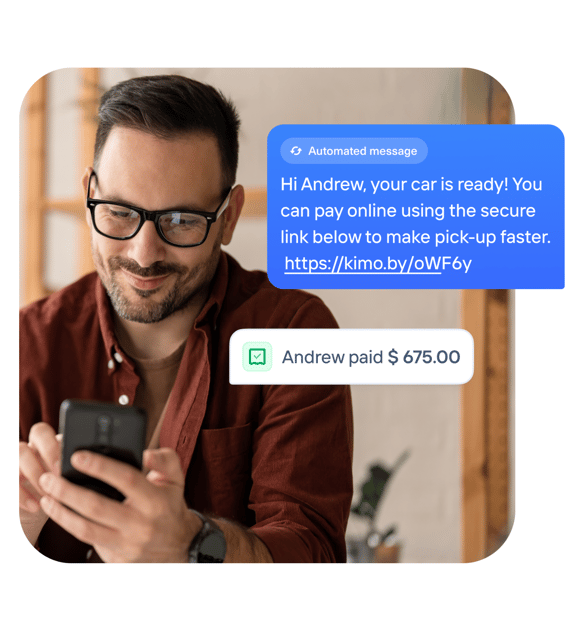
When the car is ready, Kimoby sends a secure payment link by text. The customer pays from wherever they want, with a card, Apple Pay, Google Pay, or Buy now pay later financing.
The payment is recorded against the right RO, and on CDK it writes back to your DMS automatically.
Mobile payments are included in the Service Lane OS.
1,000+ customers run on Kimoby.
Mobile payments are part of the Service Lane OS.
From finished RO to paid, in one text
Finalize the RO the way you always do.
Close the repair order in your DMS as usual. No new tool, no double entry. The invoice total and RO number are already there.
Send the secure link by text.
One click sends the customer a secure payment link in the same conversation. The amount and RO reference fill themselves, so there is nothing to retype.
They pay from their phone.
Card, Apple Pay, Google Pay, or Affirm financing, on their own time, from the lounge or before they even come in. Bigger jobs get approved when they can be paid over time.
The payment records against the RO.
The transaction is recorded against the right RO with the amount, method, and closure. On CDK it writes back to your DMS automatically, so your accounting office reconciles without re-keying.
Everything mobile payments need
Send, get paid, reconcile, all from the tools your team already uses.
Pay by text link
Send a secure payment link by SMS in one click. The customer pays from their phone, before pickup, after hours, or from the waiting lounge.
Apple Pay & Google Pay
Customers pay with the wallet already on their phone, plus every major credit card. Fewer taps, faster checkout.
Affirm financing
Buy Now, Pay Later on the payment link. Expensive repairs get approved when they can be paid over time, and you get paid in full right away.
Automatic payment messages
Confirmation texts send themselves when a payment clears, so the customer and the advisor both know it is done.
Payment reminders
Nudge customers who have not paid yet, without a phone call.
Real-time payment view
See every request and its status instantly. Know what is paid, pending, or overdue at a glance.
Deposits for cars & parts
Take a deposit by text for a special-order part or a vehicle, without the customer coming in.
Refunds with permissions
Issue refunds in the app only, with team permission control, so nothing happens off the books.
CDK writeback
Every transaction syncs to CDK with amount, method, and closure, so reconciliation is accurate without re-keying.
Automated daily reports
Daily deposit and transaction reports land on their own for clean bank reconciliation.
Optional surcharge
Apply a transparent, compliant service fee to cover processing costs, shown to the customer before they pay.
Fraud protection
Automatic customer validation flags inconsistencies before a payment processes, so you catch fraud before it costs you.
The old way vs the Kimoby way
Before Kimoby
- ✕Customers wait in line at the cashier to settle up
- ✕Card numbers read out over the phone
- ✕Big repairs stall because the customer can't pay it all at once
- ✕Advisors ringing up invoices instead of working ROs
- ✕Payments re-keyed into the DMS by hand
With Kimoby
- ✓Customer pays from their phone before they reach the counter
- ✓Secure link, card, Apple Pay, Google Pay, or Affirm
- ✓Financing on the link, so bigger jobs get approved
- ✓Advisors stay on ROs, not the register
- ✓Payments post back to the RO, writeback on CDK
With Kimoby Pay, we don’t have to second-guess payments anymore. It gives us one less thing to worry about.

Luis Lopes
Service Manager at Mercedes-Benz Langley
What mobile payments change in the lane
Real numbers, from the dealerships using Kimoby Pay.
of counter time removed per payment when the customer pays from their phone.
processed across the Kimoby dealer network.
Secure by default
Kimoby never stores or transmits raw card data. Stripe handles processing through hardware-level encryption, so card data never touches your dealership network.
- ✓ PCI DSS Level 1, tokenized payments
- ✓ Funds deposited within 24 hours
- ✓ Refunds issued in the app only, with permission control
- ✓ Automatic customer validation to flag fraud before it processes
Included in the Service Lane OS. Works with your DMS. No form, no sales call.
Frequently asked questions
Mobile payments let your service department send a secure payment link by text so the customer pays their invoice from their phone, before pickup or from the waiting lounge. They can pay by card, Apple Pay, Google Pay, or Affirm financing, and the payment is recorded against the right repair order, with automatic writeback to your DMS on CDK. It is part of Kimoby Pay and included in the Service Lane OS.
They tap the link in the text and choose how to pay: any major credit card, Apple Pay, Google Pay, or Affirm financing. No app to download and no account to create.
Affirm is Buy Now, Pay Later, offered right on the payment link. The customer applies in a few taps and pays over time, while your dealership is paid in full immediately. It helps expensive repairs get approved. At Policaro Acura, the average Affirm-financed RO grew 246%, from $717 to $2,479 (published case study).
Payouts are deposited to your account within 24 hours. Daily deposit and transaction reports are generated automatically for clean bank reconciliation.
Yes. Every transaction records against the right RO with the amount, method, and closure. On CDK, payments write back automatically, so your accounting office reconciles without re-keying. Kimoby Pay works with CDK, Reynolds and Reynolds, PBS, Tekion, Serti, Dealer Vu, and Quorum.
Yes. Kimoby never stores or transmits raw card data. Stripe processes payments with hardware-level encryption and tokenization at PCI DSS Level 1, so card data never touches your dealership network. Refunds are issued in the app only, with permission control.

Optionally, yes. You can apply a transparent, compliant surcharge that is shown to the customer before they pay, to cover processing costs. It is a setting you control.